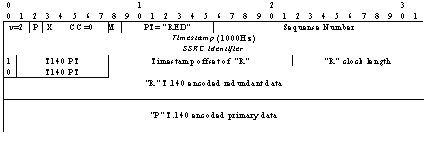
Fig. 1. RTP packet with only one redundant T140 block
NON CONTINUOUS MEDIA STREAMS TRANSMISSION USING RTP. A MULTICAST RTP-BASED TOOL
(presented as a poster at MIPS 2004, Grenoble, France)
Authors: Fernando Boronat Seguí, Juan Carlos Guerri Cebollada
Área de Ingeniería Telemática, Departamento de Comunicaciones
Universidad Politécnica de Valencia - Escuela Politécnica Superior
de Gandia
Ctra. Nazaret-Oliva S/N, 46730 Grao de Gandía (VALENCIA)
E-mail:
{fboronat, jcguerri}@dcom.upv.es
Summary :
A large number of real-time distributed multimedia applications have already been developed using the Real-Time Transport Protocol (RTP), but all of them for continuous media streams, such as audio and video. Nevertheless, in those applications, non continuous media streams such as text, data from sensors or from alarm devices, pointer coordinates, etc., also coexist with audio and video streams and need to be synchronised with them at the receivers. As an example we can cite a tele-videoconference tool including the transmission of the coordinates of the mouse or pointer position. In this example, the client players have to show the movement of the mouse or pointer synchronised with the audio and video streams. Otherwise, it would annoy the final users.
Traditionally, data for non continuous media streams has been transported using TCP or UDP that have no time information in their PDUs that make synchronisation possible. In this paper, we show the possibility of sending data from non continuous media streams using RTP, PDUs (Protocol Data Units) of which contain time information for that purpose.
We propose new RTP payload format to do it and, to test if it is feasible we have developed an experimental multicast RTP-based tool for sending data from a text conversation (like a chat tool), using this format. With this tool we have shown the possibility of using RTP to send data from non continuous media streams and get the synchronisation with continuous media streams at the receiver.
In the near future we are going to use our proposal in a security and telesurveillance
system in which data from alarm sensors and access control devices will be
transmitted together with video and audio streams.
1. Introduction
Real-Time Transport Protocol (RTP) is a protocol intended for delivery of delay sensitive content, such as audio and video, trough heterogeneous networks. The purpose of this protocol is to facilitate delivery, monitoring, reconstruction, mixing and synchronisation of data streams.
Most of RTP-based tools are developed to send continuous media streams, such as audio or video streams, but not for text or data (non continuous) streams. Moreover, in distributed multimedia applications, several non continuous media coexist with continuous media. For example, we can cite but a few examples: text data (text transcription in a teleconference for deaf people or in a network karaoke), the transmission of the pointer coordinates in a teleconference, Radio Data System (RDS) data for radio over Internet, etc. All these examples need the presentation (at the receivers) of the non continuous data streams to be synchronised with the presentation of continuous media streams.
Traditional applications use TCP or UDP for sending non continuous data streams without time-dependency. Owing to the fact that these protocols were not designed for real-time delivery, they don’t use temporal information nor define time stamping of their PDUs. Current text or data applications use buffering techniques not to smooth jitter but to reorder the received packets and wait for delayed or lost packets retransmission. If an application needs to synchronise data streams with audio and video streams it needs data to be carried in timestamped PDUs. So, a protocol like RTP is needed to transport these data to accomplish that requirement.
In the literature, previous work can be found indicating how to transmit data of non continuous media over RTP. In RFC 2793 a possible RTP payload for text conversation is proposed; RFC 2862 defines a RTP payload for transmitting pointer coordinates in real time; RFC 2833 defines a RTP Payload for DTMF Digits, Telephony Tones and Telephony Signals. There are projects about independent chat and whiteboard tools for collaborative computing using java, multicast and RTP/RTCP,
In this paper, the possibility of sending data from non continuous media
using RTP, in real-time applications, to synchronise its presentation with
the presentation of continuous media (i.e., audio or video) is shown. The
final purpose is to develop a teleconference application integrating three
tools: one for audio, one for video and another for text. Moreover, the receivers
have to display the three streams simultaneously, it means, synchronised.
The purpose of this teleconference tool is to evaluate a group synchronisation
protocol the authors have designed, called RTP-based Feedback Global Protocol.
To attain this final objective, an application for text conversation has
been developed, which is presented in this paper. It has been developed using
RTP/RTCP to allow the timestamping of the packets at the sender end. Receivers
can also calculate the playout points using these timestamps. RTP/RTCP has
been chosen because it was proposed by IETF in RFC 1889, and it is accepted
as a standard for real time multimedia transmission. It is the Internet transport
protocol for real time multimedia streams and supports the transmission of
time-dependent media, over wide-area networks (WANs), by adding synchronisation
and quality-of-service (QoS) feedback capabilities to the existing transport
protocol. RTP has been widely used in the Multicast Backbone network (MBone).
As a text conversation tool, the application will follow the specifications
of RFC 2973, RTP Payload for Text Conversation. We are conscious that this
tool is only a prototype to test our synchronisation protocol and that it
is not necessary the use of RTP for a chat application working independently
(there are lots of chat applications that don’t need RTP). Despite this,
we have not limited to develop a tool to work jointly with other multimedia
tools, only thinking in that final synchronisation objective, but we have
developed it as a full text conversation application like other chat tools.
On account of it we have called it RTP_Chat.
2. Text Transmission over RTP
2.1. RTP payload for text conversation (RFC 2793)
According to RFC 2793, text conversation session contents are specified
in the ITU-T Recommendation T.140. Text conversation can be used alone or
in connection to other conversational facilities, such as video and voice,
to form multimedia conversation services (authors’ final objective). RTP
payload description in that RFC contains an optional possibility to include
redundant text from already transmitted packets in order to reduce the risk
of text loss caused by packet loss. The redundancy coding system follows
RFC 2198.
Users can enter text characters from a keyboard, handwriting recognition,
voice recognition or any other input method. Normally, the character rate
entry is usually at a level of a few characters per second or less. Therefore,
the expected number of characters to transmit is low. Only one or a few new
characters are expected to be transmitted in each packet. According to T.140,
text and other T.140 elements must be transmitted in ISO 10646-1 code with
UTF-8 transformation. That permits to implement international useful applications
easily and to handle text in modern information technology environments.
Payload of a RTP packet following this specification consists of text encoded
according to T.140 without any additional framing. T.140 requires the transport
channel to provide characters without duplication and in original order.
Text conversation users expect that text will be delivered with no or a low
level of lost information. If lost information can be indicated, the willingness
to accept loss is expected to be higher.
RTP payload. The payload format of the RTP packets for text conversation consists of a RTP header as defined in RFC 1889, followed by a block of primary T.140 data (collectively named T140 block) and redundant data blocks (if redundancy is used). In Fig. 1, a RTP packet with one redundant T140 block is presented (this format is used in the tool presented in this paper).
The T140 block contains one or more T.140 encoded elements as specified in ITU-T T.140. Most T.140 encoded elements are single ISO 10646-1 characters, but some ones are multiple character sequences. Each character is UTF-8 encoded into one or more octets. This implies that each block must contain an integral number of UTF-8 encoded characters regardless of the number of octets per character. It also implies that any composite character sequence should be placed within one block. RTP header can be followed by one or more redundant data block headers, the same number of redundant data fields carrying T140 blocks (R or redundant) from previous packets, and finally the new (P or primary) T140 block for this packet.
Fig. 1. RTP packet with only one redundant T140 block
RTP packet header. Each RTP packet starts with a fixed RTP header. The main fields of the RTP fixed header used for T.140 text streams are:
- Payload Type: For T.140 text, the payload type is
identified by the name ‘T140’. If redundancy is used, this type will be ‘RED’.
- Sequence number: It is used for detection of packet loss
and packets out of order. It can also be used in the process of retrieving
of redundant text, reordering text and marking missing text.
- Timestamp: The RTP Timestamp encodes the approximate
instance of entry of the primary text in the packet. A clock frequency of
1000 Hz must be used. Since packets do not represent any constant duration,
the timestamp cannot be used to directly infer packet losses.
Additional headers. There are no additional headers defined specific to this payload format. When redundant transmission of text data is desired, one or more redundant data block headers follow the RTP header, one for each redundant data block to be included (see Fig. 1). Each of these headers provides the timestamp offset and length of the corresponding data block plus a payload type number indicating this payload format (‘T140’).
T.140 Text structure. T.140 text is UTF-8 encoded as specified in T.140
with no extra framing. When using the format with redundant data, the sender
may select a number of T140 block generations to retransmit in each packet.
A higher number introduces better protection against loss of text but decreases
the data rate and increases the size of packets.
Since packets are not generated at regular intervals, the timestamp is not
sufficient to identify a packet in the presence of loss unless extra information
is provided. Since sequence numbers are not provided in the redundant header,
some additional rules must be followed to allow redundant data, corresponding
to missing primary data, to be merged properly into the stream of primary
data T140 blocks:
- Each redundant text data block must contain the same
data as a T140 block previously transmitted as primary data, and be identified
with a timestamp offset equating to the original timestamp for that T140
block.
- The redundant data must be placed in age order with
most recent redundant T140 block last in the redundancy area.
- All T140 blocks from the oldest desired generation up
through the generation immediately preceding the new (primary) T140 block
must be included.
These rules allow sequence numbers for the redundant T140 blocks to be inferred by counting backwards from the sequence number in the RTP header. The result will be that all the text in the payload will be consecutive and in order.
Based on the information in the received packets, the receiver can reorder text received out of order, mark where text is missing because of packet loss and compensate for lost packets by using redundant data.
3. Multicast tool for text transmission
RTP_Chat is a unicast or multicast application for text conversation that transmits text using RTP and follows the specifications explained above. It is a non server based tool, with no central control point (so it is more robust but more complex than server based tools). So each user has to control its own state and the session state. In multicast sessions, a user who wants to participate only has to join the session (the session is defined by a multicast IP address and a port number). Users send text messages to that address and port number and they will be forwarded to all the other users who joined the session.
The application uses RTP/RTCP on top of UDP. RTCP is used to convey information in a multicast environment and RTP to transport text information. RTP/RTCP properties allow the application to control situations with packet loss, out-of sequence delivery, synchronisation problems, etc. The use of RTP/RTCP allows the tool to inter-work with other RTP-compliant products.
The Graphical User Interface (GUI) of the application has been developed using TCL/TK but the core of the program has been written in ‘Visual C++’. It has been necessary to link the ‘C++’ functions with the TCL/TK graphical interface.
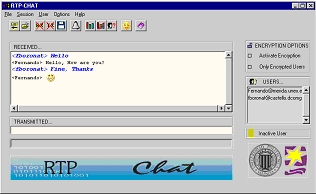
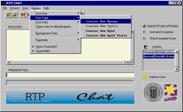
Fig. 2. Main Window
The architecture of the application is shown in Fig. 3. This application has four main blocks: User Session Control Block, Transmission and Reception Blocks and Synchronisation Block.
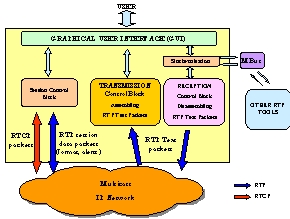
Fig. 3. Architecture
3.1. Starting the application
There is an initial program to configure and launch the application in a unicast or multicast way (Fig. 4). It interacts with user to obtain information about him/her (name, e-mail, …) and about the session (IP address and port number).
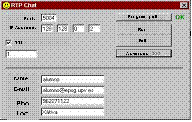
Fig. 4. Launching program
When user pushes the Run button, the main window (Fig. 2), is displayed. This is a typical window for chat programs with the following parts: menu bar, with all the options of the application; icon bar, with icons to do the most common actions; transmission window to write text for transmission; reception window, where all the text messages in the session are displayed; encryption window, to activate the encryption options; users window, to list all the users in a session and facilitate the selection of one of them; and a quick help bar, to give information of the different options when the mouse is over icons and menus. Users only have to write in the transmission window and push Enter to send a sentence to the other participants.
Main options
Sending text messages. When a user wants to send a text message, only has to write it in the transmission window and push Enter. Both sent and received text appear at the non-editable reception window, preceded by the alias of the user who sent the message, as it can be seen in Fig. 2. User can change the format of the text that is going to send with the Options menu (Fig. 5a). It is possible to change the size, type and the colour of the selected font. The application only includes Courier New type (Normal, Italic, Bold and both Bold and Italic) because it is the standardised font by ISO.
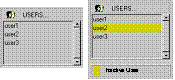
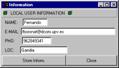
Participants. There is a control list, in the main window, with all the session participants, in which the first one is the local user (Fig. 5b). If a user leaves the session or is disconnected (for example, because a network error), when the application detects it, it marks that user with a yellow bar.Information about each participant can be obtained selecting him in the users window and pushing the information icon (Fig. 5c). The configuration of local information can be viewed or changed through the main User menu, selecting the Local User Information option (Fig. 5d).
Smileys. As shown in Fig. 2, the application includes the possibility of sending smileys or icons that express participant’s mood, with the purpose of making conversations more enjoyable and friendly. User can send smileys selecting one in an icon list (by clicking the smiley icon in the main window) or writing the equivalent sequence of characters. In table 1, there are few of the smiley icons included, with their meaning and the sequence of equivalent characters.
Table 1. Examples of Smileys and their equivalent characters
|
|
|
|

|
|
|

|
|
|

|
|
|

|
|
|

|
|
|
User Alert. This Application also includes the possibility of sending a message to alert another user (bell message or visual message). To send an alert message, user only has to select a remote participant in the user list and push the alert icon (a bell, see Fig. 2) in the main window or select the option Alert User in the Session Menu. If remote user has activated Show Visual Alert, Fig. 5e shows the message that will appear on the remote participant’s screen. If receiver has activated Sound Alert, a beep sound will be listened alerting him/her. This feature improves the interactivity of the tool and allows the users to work with other applications at the same time. When a user receives a bell (sound) alert message he/she will be able to change to RTP_Chat and initiate a chat conversation with the new user. There are two types of alerts: visual and sound alerts. User can select one of them or both from the Options menu (Fig. 5a).
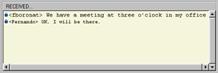
Private Conversations. If several users in a multicast session want to maintain a private conversation, they can activate encryption system and use all of them the same private key (minimum 8 characters keys). Immediately, sent text messages will appear in the reception window with a padlock icon on the left (Fig. 5f). Users in a private conversation will also receive text messages from other users in the same session. If they don’t want to receive text from other users, they have to activate the option Only encrypted Users (see Fig. 5f).
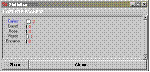
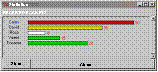
Statistics. As the application was initially designed as a part of an experimental integrated multimedia tool, it includes graphical statistics about the session. It displays two types of statistic data in bar charts: Lost RTP packets and the number of Received Packets (including both RTP data and RTCP control packets). In Fig. 5g, both types of charts are displayed. It is also possible to store the bar chart in postscript format in order to be compatible with the most common graph editors.
Help. The application has a complete manual in a windows help file.



c) User information d) Local user configuration e) Visual Alert message.


f) Private conversations


g) User statistics
Fig. 5. Tool windows