CV Manager (Antonio Sala)
Ever needed
to format your CV differently for different people, to select a different
subset of publications, in different languages, etc.?
Manage your
CV from this Windows application.

It allows
you to:
-
Store the data record,
link to the PDF file of a publication within your local machine, link to the
DOI (or whatever external link) and open it.
- Query
your CV to count how many journal papers you have, how many of them with author
xxx, how many conference papers in the last 2 years, etc. (via SQL and
google-search like queries).
- Select
“relevant” publications and projects to include only them (if they don’t
exactly match the result of an SQL query).
-
Search in internet for
it (for instance, to locate citations).
-
Output HTML-formatted
documents (tip: paste to word or other office software if you wish).
-
Output LaTeX formatted
documents
-
Compute your H-Index
(Citation analysis menu)
-
List who wrote papers
with you (Collaboration count).
-
The saved database is
in XML format (human and machine readable).
- Import
and Export ( BiBTeX and RIS formats, beta!). BiBTeX tags are automatically
generated (similar to Google Scholar); if a manual bibtex tag is needed, add
<UserDefinedBiBTeXTag>WriteHereYourTag</UserDefinedBiBTeXTag>
to the relevant XML record (edit the CVX file with a text editor). *Note: this
is no longer needed in version 1.5.0: the “user defined tag” has been added as
a field in the forms; leave it blank if you are happy with the auto tag. You
can use the auto and user tags (BiBTeXTag property) for whatever you wish, not
only for BiBTeX export.
- Join
several databases, for “group” CV’s. Note: duplicate records are kept.
Detection of them will be dealt with in a future release (maybe).
- Save
a subset of a database (for instance, getting an individual database from a
group one, by saving <<Publication where
Author.Contains(“MySurname”)>> )
DOWNLOAD:
-
Application version 1.7.0.0,
ZIP [Click here]
[Tested on WinXP SP2].
Note: You might be required to install
files from Microsoft .NET Framework 3.5 SP1 runtime. Depending on your CPU and
network bandwidth, installing .NET 3.5 might take a long time (+20 min). The .NET Framework is used in many current
applications developed with Microsoft programming languages and tools. With
.NET installed, the application is less than 2 Mbytes, so it downloads and
installs quickly.
-
An example of Format
Files (not fully tested, and maybe a bit version outdated). [Click here]
[See older versions and release
notes at the end of the file]
Basic usage of CV Manager:
-
Forms to input data are
self-explanatory. Input cites as 5/4/2 (5 total cites, four without me, 2 from
none of the coauthors). Input dates as DAY/MONTH/YEAR

-
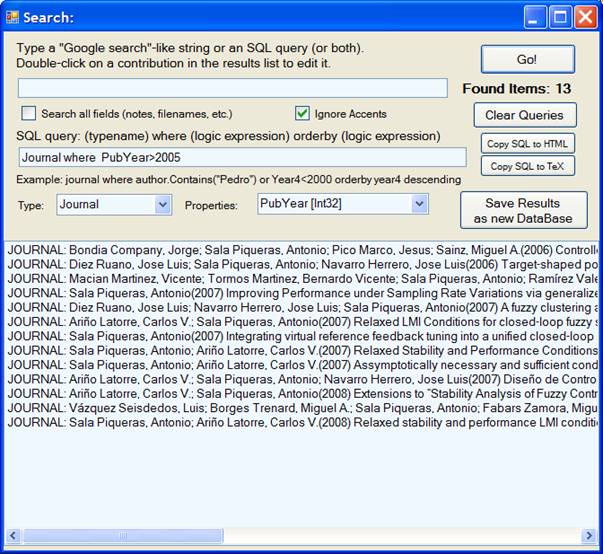
Search for a particular
publication or set of them with the search button.
The search form
is one of the key ones, as its SQL queries may be pasted into the LaTeX and
HTML sources, which is the basic mode of operation. The ListBoxes under the SQL
textbox show which types and properties can be used to form the queries.
The “other
docs” form allows for additional information, classified by a user-defined
string code so that suitable queries can be made, for instance
<OtherDocuments where ClassificationCode.Contains("EST")>.
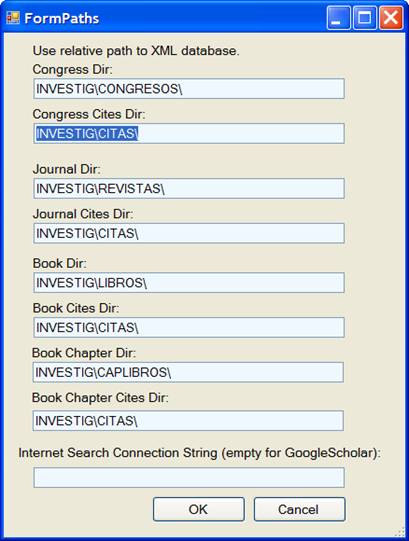
Links to
files in your computer will not open if the paths are not correctly set.
Remember to set up them in the path form:
Producing output.
The
processing tab is a “legacy” that I didn’t use long ago. However, it shows the
main components of the processing workflow:
-
Author Emphasis file:
first line expresses the “emphasis” command desired, subsequent lines express
the strings to emphasize in the authors field (in order to put your name in
bold, italics, or whatsoever).
-
Output file where the
list of formatted publications will be written
-
Format file. The format
to use.
Well, the
processing tab might help filtering txt or other formats… however, the
important LaTeX or HTML have a dedicated button.
LaTeX Output.
Generate a
file with:
\newcommand{\CVEMPH}[1]{}
\newcommand{\CVSQL}[3]{\input{#3}}
\newcommand{\CVDATABASE}[1]{}
\newcommand{\CVFORMATS}[1]{}
In the
Preamble (before \begin{document}).
Then, add,
after \begin{document}:
\CVEMPH{path
to emphasis file} \CVDATABASE{path to database.cvx}
And, later,
when you want some listings, use \CVSQL{query}{format file}{output file}.
For
instance [note also the LaTeX “trick” to continue enumerations]:
\subsection{Full
Books}
\subsubsection*{Author:}
\begin{enumerate}
\CVSQL{Book where not
IsEditor}{../texformats/formatlibros.tex}{booksfull.tex}
\setcounter{contlibros}{\value{enumi}}
\end{enumerate}
\subsubsection*{Editor:}
\begin{enumerate}\setcounter{enumi}{\value{contlibros}}
\CVSQL{Book where
IsEditor}{../texformats/formatlibros.tex}{booksed.tex}
\setcounter{contlibros}{\value{enumi}}
\end{enumerate}
\newcounter{journalitems}
\subsection{Top
Impact Journals}
\begin{enumerate}\CVSQL{Journal where
ImpactThird=3}{../texformats/formatjournal.tex}{journ1.tex}
\setcounter{journalitems}{\value{enumi}}
\end{enumerate}
\subsection{Rest
of Journals}
\begin{enumerate}\setcounter{enumi}{\value{journalitems}}
\CVSQL{Journal where
ImpactThird<3}{../texformats/formatjournal.tex}{journ2.tex}
\setcounter{journalitems}{\value{enumi}}
\end{enumerate}
\end{document}
And so, on,
write your CV. Once finished editing, click on the “process LaTeX File” button,
select the file, wait till the CV Manager completes its task, and “LaTeX
it”. Voila! Your CV appears with the requested lists of publications (CV
Manager generates the output files and LaTeX includes them). Change the queries
and the formats for different CV requirements.
Note: If the format file is left blank, the default
format will be used.
Such a default format may be either loaded with a command
\CVFORMATS{path/filename.xml}
or loaded in the application via the buttons in the window:

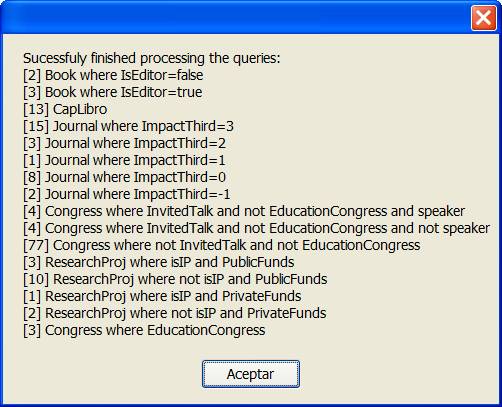
As an
example, a quite detailed CV may be produced with the queries:
HTML output (UTF-8 encoding).
The
procedure is similar. However, as no “include” is available in standard HTML,
the application acts as a filter. Commands are placed as comments. As an
example, if this HTML is passed through the CV Manager, it will generate
another HTML file (adding “filtered” to the filename), containing the journal
papers published in 2007, and another section with all journal papers.
<html>
<head>
<META
HTTP-EQUIV="Content-Type" CONTENT="text/html;
charset=UTF-8">
<title>This is a
test</title>
</head>
<body>
<!--
\CVEMPH{../BaseDeDatos/emphhtml.txt}
\CVDATABASE{../basededatos/produccion08feb.xml}
--->
Note:
include \CVFORMATS{…} if desired for default formats
<H1>Journals in
2007</H1>
<ul>
<!--\CVSQL{Journal
where Pubyear=2007}{formatrv.txt}-->
</ul>
<H2>ALL JOURNALS
NOT IN ENGLISH:</H2>
<ul>
<!--\CVSQL{Journal
where Language!=”English”}{formatrv.txt}-->
</ul>
</body>
</html>
For
instance, this may be the associated format file formatrv.txt, just one line:
<li>\FIELD{AuthorShort}
\FIELD{Title}, <i>\FIELD{PublicationName}</i>,(\FIELD{PubYear})
Support, bugs and known issues:
This is a
“beta” release. It worked for me and I post it in the web for others to use,
but there are some known issues:
-
No input validation is
performed: insert something strange and it will hang. Even empty fields may
produce exceptions in queries (don’t worry about these exceptions or syntax
errors in your queries: they do not corrupt the database). Advice: save
frequently and change name from time to time so it does not corrupt anything,
until you have tested it suitably.
- Interaction
with Group CV’s and individual ones is not fully functional. The application
was born to manage individual records. Anyway, in the “notes not to print” you
may include the names of whoever you want in order to later be able to split in
individual CVX databases; you can also save a search where
“Author.Contains(“mysurname”)”…
-
No support (sorry!). It
has been tested only in Windows XP Professional with .NET 3.5 installed. I
don’t know what will happen in Vista / wine / Other .NET versions.
-
No Export/Import
to/from Access, etc. (limited import/export from clipboard or file in BiBTeX or
RIS).
- The
XML format is not “frozen”: please contact me if you plan to write an import
filter for your own applications, in order to “freeze” it.
-
Some issues about
working directory changes and not finding files.
- Sometimes
asks to save file on exit even if no changes since last save.
- In some cases, if a query or file processing
takes some time, the application user interface freezes until done.
[multithreading not yet complete]
-
Year is a string (which
sometimes contains full dates). In order to sort or query, please use PubYear
which is an integer.
-
Remember to set your
HTML reader (Explorer, etc.) to UTF-8 if accented and special characters seem
not to work. LaTeX files are assumed to be in 1252 Encoding.
- Importing
from RIS or BIBTEX with special characters (say, \’a for á or \mathcal{H} ) may
need later editing (see below)
- If
LaTeX or HTML commands, etc. appear in the database, then they will appear as
such when exported to HTML (which doesn’t understand LaTeX and vice-versa):
Currently, there is no way to make something appear as H2 in HTML and \mathcal{H}_2 in LaTeX.
Older builds:
-
Application
build 1.3.1, ZIP [Click here]
-
Application
build 1.6.1, ZIP [Click here]
Release Notes
Release
Notes for version 1.1:
-
Added
the option of working with an XML file which holds all format files.
-
Added
Export to BiBTeX and paste from clipboard in bibtex format (a new item is
added).
-
Added
Congress Committee activities.
Release
Notes, version 1.2:
-
Paste
new accepts both BiBTeX and RIS formats.
-
Exports
and Imports from/to BiBTeX (no macros STRING… and no translation of \’i etc… )
and RIS (UTF-8). [imported journal data will only contain name and, sometimes,
ISSN].
Release
notes, version 1.3:
-
Some
bug fixes and minor cosmetic changes.
-
Records
on a CVX database may be added to the currently open one.
-
Added
“include myself” buttons in authors and researchers
-
Added
“publish” and “relevant” checkboxes in order to allow for more flexible
selections.
Release
notes, version 1.3.1:
-
Fixed
a major bug which corrupted the database if a congress committee membership was
added.
-
When
saving the database, the old one is renamed to *.cvxbak in order to keep a
backup, just in case.
Release
notes, version 1.5.0:
-
minor
bug fixes and cosmetic changes.
-
Background-worker
multithreading for some time-consuming tasks, avoiding freezing the user
interface.
-
Added
research line to the different database items in order to ease classification
-
Citation
analysis results can be clicked to see and edit details
-
Added
“tree view” window, classifying all contributions by type, year or
researchline.
Release
notes, version 1.5.0.1:
-
Bug
fix in HTML output.
-
Compiled
with Visual C# 2008 SP1, Microsoft .Net Framework 3.5 SP1.
Release
notes, version 1.6.0.1:
-
Added
ability to associate research projects to each publication
-
Minor
cosmetic changes to forms
Release
notes, version 1.7:
-
Added
support for supervised Ph.D. Thesis (beta)